- AI Engineering
- Posts
- Run 100 ML Experiments on a Single GPU (Karpathy's AutoResearch)
Run 100 ML Experiments on a Single GPU (Karpathy's AutoResearch)
... PLUS: Mistral Vibe: Terminal agent with custom subagents

Sumanth P
March 20, 2026
In today’s newsletter:
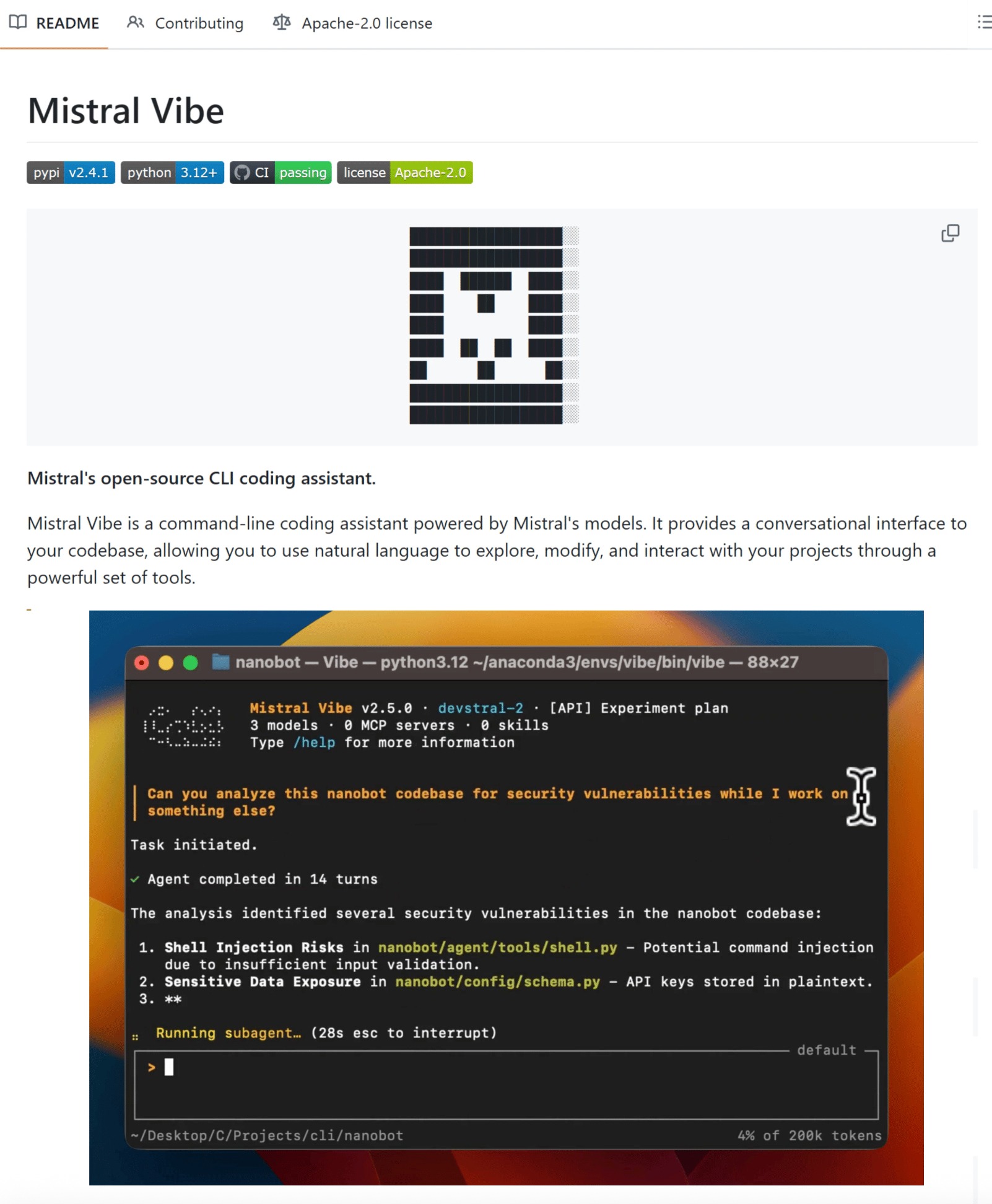
Mistral Vibe CLI: Terminal agent with custom subagents for specialized coding workflows
AutoResearch: Autonomous ML experimentation loop that optimizes training code while you sleep
Reading time: 4 minutes.
Most terminal agents give you one assistant that does everything. Mistral Vibe lets you build custom subagents for specialized tasks like deploy scripts, PR reviews, and test generation, then invoke them on demand.
It's an open-source CLI agent powered by Devstral 2 that runs entirely in your terminal.
How it works:
Start vibe in any project and the agent automatically scans your file structure, Git status, and imports to understand your codebase. Each subagent you create runs independently with full project context.
You might have one subagent for PR reviews, another for testing, and another for deployment. Invoke them with a single command while they inherit full codebase context.
Example workflow:
"Refactor the auth module to use dependency injection"Vibe breaks tasks into steps, shows what it plans to do, and handles coordinated changes across multiple files instead of just the one you're editing.
Key capabilities:
Custom subagents: Build specialized agents for targeted workflows. Each handles its job without cluttering your main workflow.
Web search and fetching: Query and fetch content from the web mid-session for documentation or API references.
Multi-choice clarifications: When intent is ambiguous, Vibe prompts with options instead of guessing. Prevents mistakes on destructive operations.
Slash-command skills: Load preconfigured workflows with
/deploy,/lint, or/docs. Extensible via the Agent Skills standard.
Works in your terminal or integrates into VS Code, JetBrains, and Zed via Agent Client Protocol. Run it with Mistral's API or point it to local models through config.toml.
Mistral Vibe is included with Le Chat Pro and Team plans. It's 100% open source.
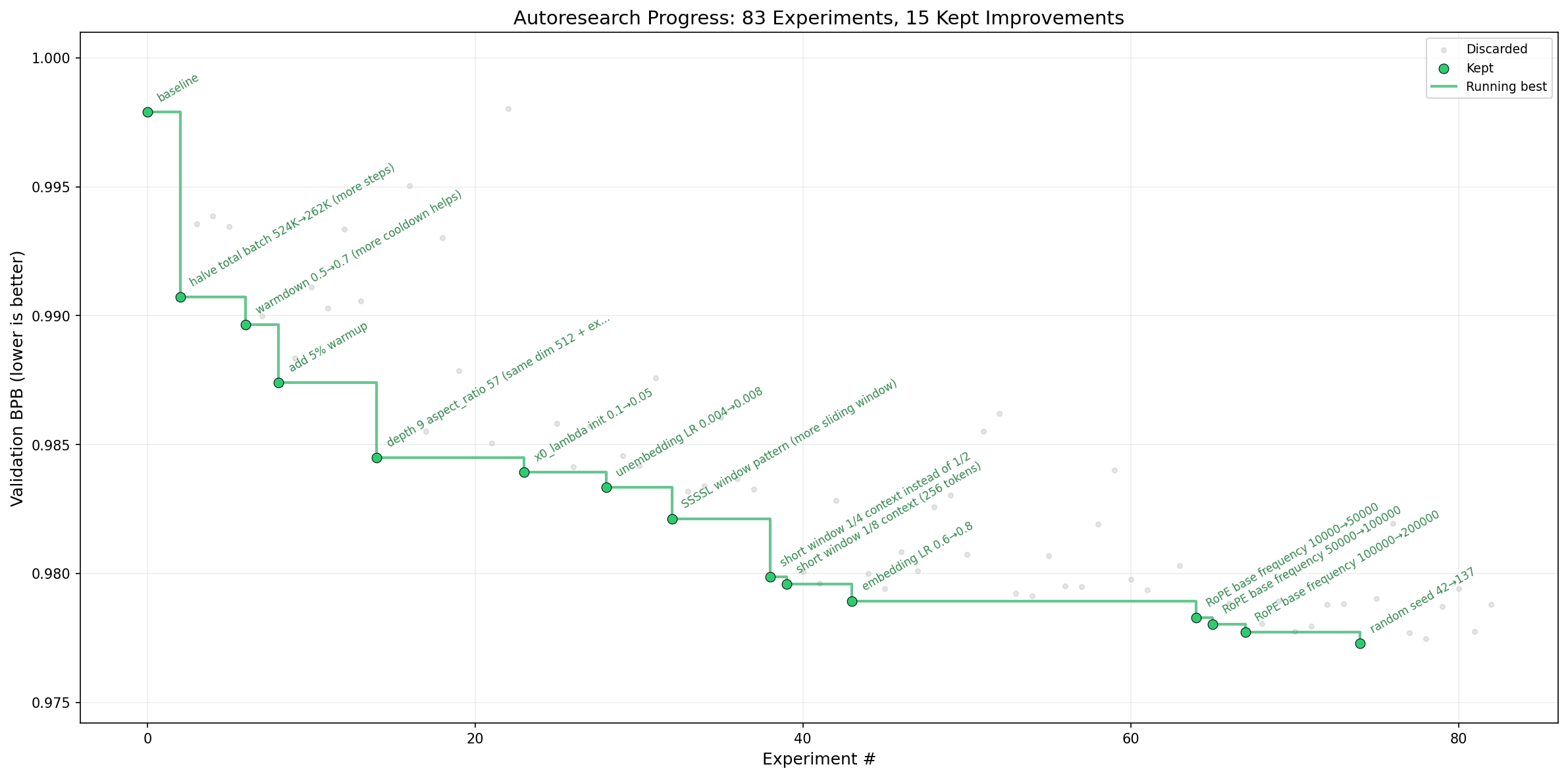
Machine learning research follows the same loop. Adjust a hyperparameter, run training, check validation loss, repeat. Do this manually and you might complete 20 experiments in a week.
Andrej Karpathy's AutoResearch runs that loop autonomously. Point it at a training script, step away, and the agent handles everything: modifies code, trains models, evaluates results, commits improvements to Git.
Real results across different setups:
Shopify's CEO ran AutoResearch overnight on an internal query model. The agent completed 37 experiments autonomously. The optimized 0.8B model beat their manually-tuned 1.6B baseline by 19%.
Karpathy's own run on nanochat (8x H100s) completed 276 experiments over multiple days. The agent kept 29 improvements and reduced validation loss from 0.9979 to 0.9697. More importantly, optimizations discovered on a small depth-12 model transferred cleanly to a depth-24 model. The agent found fundamental architectural insights, not lucky shortcuts.
A distributed run across 35 agents on the Hyperspace network completed 333 experiments in one night. Hardware diversity revealed surprising strategies: H100 GPUs used brute force with aggressive learning rates, while CPU-only agents on laptops compensated with clever initialization (Kaiming, Xavier) and normalization choices.
Why the 5-minute fixed budget matters:
Every experiment runs exactly 5 minutes of wall-clock training, regardless of what the agent changes. Smaller model? Larger batch size? Different optimizer? Doesn't matter. Every run gets 5 minutes.
This design choice enables two things. First, all experiments become directly comparable. Second, the system auto-optimizes for your specific hardware. A smaller, faster-training model might complete more steps in 5 minutes and outperform a larger one on your GPU.
The ratchet mechanism:
Performance is measured using validation bits-per-byte (val_bpb), a vocabulary-independent metric that works regardless of architectural changes. If an experiment improves this number, the change gets committed to a Git branch and becomes the new baseline. If it doesn't, Git resets like it never happened.
The agent never moves backwards. Every improvement builds on the last. Over time, validation loss only trends in one direction.
How it works:
Three files, 630 lines total:
prepare.py- data preprocessing, evaluation harness (agent never touches this)train.py- model architecture, optimizer, training loop (agent's playground)program.md- research instructions in plain English (you write this)
You're not editing Python files anymore. You're programming the research organization in Markdown. The agent handles code execution.
Start the loop: ~12 experiments per hour, 100+ overnight.
What the agent discovered:
In Karpathy's runs, AutoResearch found attention scaling bugs, missing regularization, and warmup schedule improvements he'd overlooked after months of manual development. These stacked for an 11% efficiency gain, dropping "Time to GPT-2" from 2.02 hours to 1.80 hours on hardware he considered already optimized.
The entire codebase fits in an LLM's context window. The agent sees everything at once, understands dependencies, and reasons about changes holistically instead of file-by-file.
That’s all for today. Thank you for reading today’s edition. See you in the next issue with more AI Engineering insights.
PS: We curate this AI Engineering content for free, and your support means everything. If you find value in what you read, consider sharing it with a friend or two.
Your feedback is valuable: If there’s a topic you’re stuck on or curious about, reply to this email. We’re building this for you, and your feedback helps shape what we send.
WORK WITH US
Looking to promote your company, product, or service to 160K+ AI developers? Get in touch today by replying to this email.