- AI Engineering
- Posts
- [Hands-on] Run Claude Code Locally With Ollama
[Hands-on] Run Claude Code Locally With Ollama
... PLUS: Agent Skills That Work with Any LLM

Sumanth P
February 13, 2026
In today’s newsletter:
Acontext: Agent Skills That Work with Any LLM
Claude Code + Ollama: Run Claude Code Locally with Open-Source Models
GitHub Copilot SDK: Embed Agentic Workflows in Your Application
Reading time: 5 minutes.
Acontext is an open-source platform that lets you execute agent skills (pptx, xlsx, docx, pdf) with any LLM provider through standardized tool-calling interfaces.
Claude Skills API is powerful, but it locks you into Claude models and executes skills in a black box.
Acontext removes both limitations.
Skills work with any LLM (OpenAI, Claude, Gemini, DeepSeek) through OpenRouter. Upload skills once, use them across providers without rewriting code.
The key difference: execution transparency.
With Claude API, the model executes skills inside a managed runtime. You get outputs, but no visibility into how they ran.
With Acontext, execution is explicit and user-controlled. Skills run in your sandbox with full observability: stdout, stderr, artifacts, logs, and replay capability.
Key Features:
Agent skills (pptx, xlsx, docx, pdf) that work with any LLM
Developer-owned execution with full transparency
Observable logs and artifact outputs
Context storage across OpenAI, Anthropic, and Gemini formats
Single API for uploading, managing, and running skills


Running AI coding agents is expensive.
Every file read, every code edit, every terminal command hits Anthropic's API and burns through credits.
For hobby projects, this adds up fast. For proprietary codebases, there's a bigger problem: your code is leaving your machine.
Some teams are okay with that trade-off. But many aren't.
The obvious alternative is to run everything locally. But until recently, that meant building your own orchestration layer, implementing tool calling from scratch, managing conversation state manually, and dealing with model-specific quirks.
That's weeks of engineering work just to get what Claude Code gives you out of the box.
The breakthrough: Ollama v0.14.0
Ollama introduced Anthropic Messages API compatibility in version 0.14.0.
This is the specific change that makes everything work: Ollama now speaks the same protocol Claude Code expects.
What this means in practice:
Claude Code thinks it's talking to Anthropic's servers
But you're pointing it to
localhost:11434insteadOllama translates requests to whatever model you've downloaded
Everything happens on your machine
How it actually works
Step 1: Get a local model running
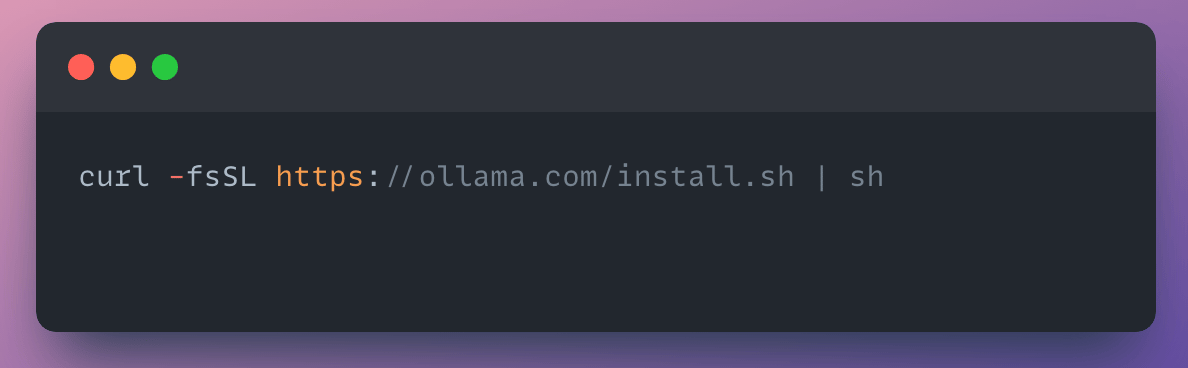
First, you need to install ollama. This is easily achieved with the command:
Next, you need Ollama to host your model.
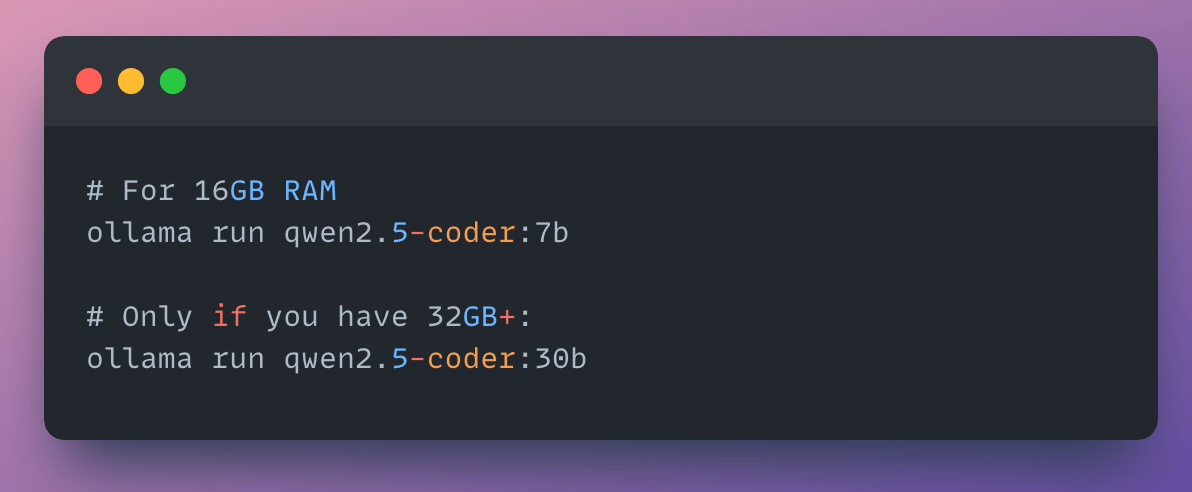
Why qwen2.5-coder? It's specifically trained on code and supports tool calling, which Claude Code needs for file operations and terminal commands.
Cloud models work too if you need more capability:


These run remotely but are free and always have full context length. I recommend starting with local models for privacy, with cloud models as a fallback.
Important: Make sure you use models with at least 32K tokens context length. Ollama's cloud models always run at their full context length.
Step 2: Install Claude Code

If you were previously logged into an Anthropic account, then you have to log out

This is important. Claude Code needs to be in "no auth" mode to accept your localhost redirect.
Step 3: Launch Claude Code
If you're on Ollama v0.15 or later (check with ollama --version), just run:

That's it. The ollama launch wrapper automatically:
Sets
ANTHROPIC_BASE_URL=http://localhost:11434Sets
ANTHROPIC_AUTH_TOKEN=ollamaLaunches Claude Code with those settings for that session
If you're on Ollama v0.14 (or want to understand what's happening):
The manual approach still works. You need to explicitly redirect Claude Code to your local Ollama instance:

These environment variables don't persist across terminal sessions. To make them permanent, add them to your shell profile:

Then reload your shell:

Why this works: Claude Code expects to talk to https://api.anthropic.com. By changing ANTHROPIC_BASE_URL, you're intercepting those requests and routing them to localhost instead. Ollama speaks the same protocol, so Claude Code doesn't know the difference.
Step 4: Test it with a real task
Now comes the moment of truth. Does this actually work?
Try something concrete: "Add a Hello World website."
This is a good first test because it exercises all of Claude's core capabilities. File reading, file creation, and command execution.
Claude will:
Read your directory structure
Create
index.htmlwith a diff previewAsk for confirmation (
yto approve)Verify the file was created

I've watched multiple teams spend 2-3 months building the same agent infrastructure from scratch.
Orchestration logic. Tool calling with retries. File editing that doesn't corrupt your codebase. State management across conversations. Error handling when tools fail.
It's all undifferentiated work. You're not building anything novel. You're just recreating what every other team has already built.
GitHub's Copilot SDK changes this. They're exposing the same production-tested engine that powers Copilot CLI as a library you can call programmatically.
What the SDK provides:
The GitHub Copilot SDK exposes the same production-tested engine that powers Copilot CLI as a library you can call programmatically.
No need to build your own orchestration. You define agent behavior. Copilot handles planning, tool invocation, file edits, retries, and state management.
Here's what using it actually looks like with Python for instance:

That's it. You're not implementing retry logic. You're not building a file diffing system. You're not managing conversation state. The SDK handles all of that.
What you get:
The SDK talks to Copilot CLI via JSON-RPC and handles all the infrastructure:
File operations (read, write, edit, delete with safety checks)
Git operations (commits, branches, merges)
Web requests (APIs, scraping)
Planning, tool invocation, retries, and state management
You focus on the unique parts: custom agents for your domain, domain-specific tools, and workflows specific to your team.
Model flexibility:
Any model that works with Copilot CLI works with the SDK. Bring your own keys (OpenAI, Azure OpenAI, Anthropic) if needed.

That’s all for today. Thank you for reading today’s edition. See you in the next issue with more AI Engineering insights.
PS: We curate this AI Engineering content for free, and your support means everything. If you find value in what you read, consider sharing it with a friend or two.
Your feedback is valuable: If there’s a topic you’re stuck on or curious about, reply to this email. We’re building this for you, and your feedback helps shape what we send.
WORK WITH US
Looking to promote your company, product, or service to 160K+ AI developers? Get in touch today by replying to this email.